Building Reusable Prompts in GitHub Copilot (VS Code): A Practical Guide
Building Reusable Prompts in GitHub Copilot (VS Code): A Practical Guide
In modern AI-assisted development, developers are no longer limited to one-off prompts.
Instead, you can now build reusable prompt systems that behave like mini tools for your workflow.
This guide explains how reusable prompts work, how they differ from instructions, and how to design them effectively—and more importantly, how to create them.
1. What “Reusable Prompts” Actually Mean
A reusable prompt is a predefined task definition that you can trigger whenever needed without rewriting the same instructions.
Instead of saying:
“Review this code for bugs, security issues, performance problems, and architecture issues…”
You simply run:
/code-review
2. Prompt vs Instruction vs Skill (Quick Context)
Before building reusable prompts, it’s important to understand the ecosystem:
🟦 Prompt
A manual, on-demand task
- Runs when you call it
- Does not persist automatically
- Best for workflows
🟩 Instruction
A persistent rule set
- Always applied (added as context for the LLM)
- Defines behavior
- Should be lightweight, as they are always included in the model’s context and contribute to token usage
🟨 Skill
A reusable capability module
- Can include tools and workflows
- An emerging abstraction
- Represents a more advanced automation layer depending on your setup
NB: For this guide, we will be concentrating on prompts.
3. Why Reusable Prompts Matter
Now that the distinction is clear, here’s why reusable prompts are powerful in practice.
Reusable prompts solve three major problems:
1. Consistency
You get the same structured output every time.
2. Speed
No need to rewrite long instructions.
3. Workflow automation
You turn repeated tasks into commands.
4. How Reusable Prompts Work in VS Code Copilot
In GitHub Copilot (VS Code), reusable prompts are typically implemented through a combination of:
- Custom instruction files (e.g.
copilot-instructions.md) - Prompt templates stored in your repository (commonly under
.github/prompts) - Slash commands or chat-based triggers (depending on your setup or extensions)
These allow you to define structured workflows that can be reused across projects.
5. Anatomy of a Good Reusable Prompt
A strong reusable prompt has 5 components:
1. Name
A clear command-like identifier
2. Description
Explains when to use it:
“Run a high-rigor code review focusing on correctness and architecture.”
3. Context Rules
Defines what data to gather:
- Open file
- Selected code
- Repository context
- Optional user input
4. Execution Steps
A structured reasoning flow:
- Understand intent
- Analyze logic
- Check edge cases
- Evaluate architecture
- Assess tests
5. Output Format
Ensures consistency:
- Tables
- Severity levels
- Structured sections
6. How to Create the Prompt — Case Study: Code Review Prompt System
-
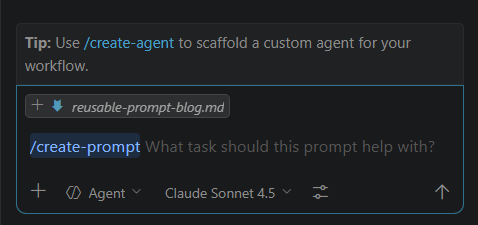
In the chat section, if your Copilot setup supports it, type
/create-promptfollowed by the task you want to create a prompt for—in this case,code review
-
It may require you to grant permission to access reference files for creating agent customizations (any relevant
agent.md,copilot-instructions.md, etc.) -
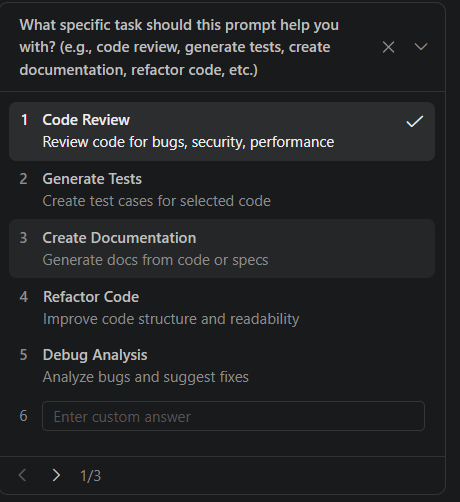
Once that is done, there will be some personalization questions you need to answer so the system can generate a prompt tailored for you
-
Once you click submit, a file will be created (commonly in
.github/prompts). This file is yours, and you can edit and customize it as needed
Sample Generated Prompt File
---
description: "Perform comprehensive code review with categorized findings on quality, readability, performance, security, and bugs"
argument-hint: "code to review"
agent: "agent"
---

Perform a comprehensive code review of the provided code, analyzing it across multiple dimensions.

## Review Categories

Organize your findings into the following categories:

### 🎯 Code Quality & Best Practices

- Design patterns and architectural concerns
- SOLID principles and coding standards
- Code smells and anti-patterns
- Adherence to language-specific conventions

### 📖 Readability & Maintainability

- Variable and function naming clarity
- Code organization and structure
- Comment quality and documentation
- Complexity that could be simplified

### ⚡ Performance Issues

- Inefficient algorithms or operations
- Unnecessary computations or redundant work
- Memory usage concerns
- Potential bottlenecks

### 🔒 Security Vulnerabilities

- Input validation and sanitization
- Potential injection vulnerabilities
- Sensitive data exposure
- Authentication and authorization issues

### 🐛 Bug Detection

- Logic errors and edge cases
- Null/undefined handling
- Type safety issues
- Race conditions or timing issues

## Output Format

For each category:

1. List findings with **severity** (🔴 Critical | 🟡 Moderate | 🟢 Minor)
2. Provide **specific line references** or code snippets
3. Explain **why** it's an issue
4. Suggest **how to fix** it with example code when helpful

### Summary

- Total issues found by category
- Recommended priority order for addressing issues
- Overall code health assessment (Excellent/Good/Needs Improvement/Critical)

**Note**: If a category has no issues, mark it as "✅ No issues found"
NB: Alternatively, you can create the file yourself inside .github/prompts/ and provide the prompt you want to reuse.
7. Using the Prompt
Once your prompt is created, you can call it using its name preceded by a forward slash, or the file name if no name is provided.
prompt files
For example:
/code-review
You can also pass any required arguments, such as the files you want to review.
This way, you don’t need to copy and paste the prompt every time you need to review code.
8. References
- https://awesome-copilot.github.com/learning-hub/what-are-agents-skills-instructions/
- https://docs.github.com/en/copilot/tutorials/customization-library/prompt-files/your-first-prompt-file
- https://docs.github.com/en/copilot/concepts/prompting/response-customization#about-prompt-files
- https://docs.github.com/en/copilot/concepts/prompting/response-customization?tool=vscode
- https://code.visualstudio.com/docs/copilot/customization/prompt-files
Asiedu Saah
Senior Fullstack Engineer